Table of Contents
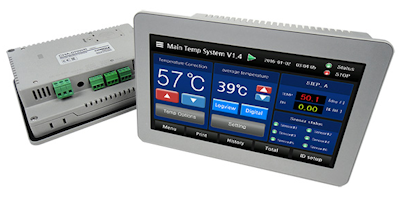
ComfileHMI
Users can easily use all functions of ComfileHMI by using the supported libraries without the need to write separate communication code.
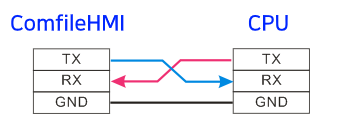
How to connect with ComfileHMI
Connect RS232C on the CPU module and ComfileHMI as shown below.
MODBUS RTU Library
This product supports up to three communication channels, with the Modbus server function available on only one of them.
If you want to use Channel 1, write the source code as follows:
#include "cfSimpleModbusRtu1.h"
If you want to use Channel 2, write the source code as follows:
#include "cfSimpleModbusRtu2.h"
If you want to use Channel 3, write the source code as follows:
#include "cfSimpleModbusRtu3.h"
IMPORTANT: You cannot use more than one channel at the same time. Make sure to use only one channel.
IMPORTANT: If you include cfSimpleModbusRtu1.h, it takes control of Serial1 so you must not also attempt to use Serial1 elsewhere in your source code. The same applies to cfSimpleModbusRtu2.h/Serial2 and cfSimpleModbusRtu3.h/Serial3
Sample Source
#include "CFMEGA.h"
#include "cfSimpleModbusRtu1.h"

CFNET cfnet;

uint16_t incvalue;
uint16_tLword[99];
uint8_tLbit[99];

void setup()
{
    // Slave address, 16-bit Word Memory, Bit Memory
    startModbusServer(1, Lword, Lbit);
}

u16ltemp;
void loop()
{
    u16 out0 = cfnet.digitalRead(0);
    cfnet.digitalWrite(0,out0);
    Lword[1] = incvalue++;
}
How to use the function
startModbusServer
void startModbusServer(u8 modSlaveadr, u16 * modbusBufferRegister, u8 * modbusBufferCoil)
| modSlaveadr: Modbus slave address (1~255) |
| modbusBufferRegister: Register Link array start address |
| modbusBufferCoil: Coil Link array start address |
Description
This function notifies the start of the MODBUS RTU slave.
uint16_tLword[99]; // Since it was declared outside the setup function, it is a global variable.
uint8_tLbit[99];

void setup()
{
    // Slave Address, 16-bit Word Memory, Bit Memory.
    startModbusServer(1, Lword, Lbit);

}
Link Array
Two types of Link array space are required to use MODBUS RTU.
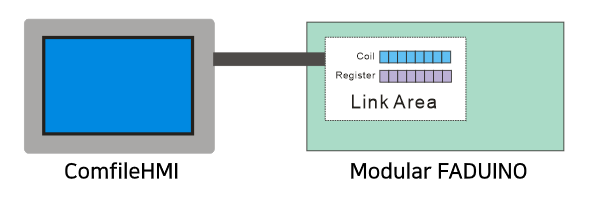
- “Register” Link array that stores 16-bit word data
- Declare the “Coil” Link array that stores 1-bit data and the 1-bit area (Coil) as a byte-type array. Only 1 bit of information is stored in 1 byte. It is true that data space is wasted, but it is unavoidable because there is no variable type that handles bits in C language.
Description of operating principle
If you just activate startModbusServer in the library like this, communication between ComfileHMI and CPU module will take place automatically.
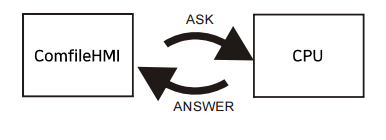
This is a method in which an interrupt is generated at regular intervals and communication data coming from ComfileHMI is processed.
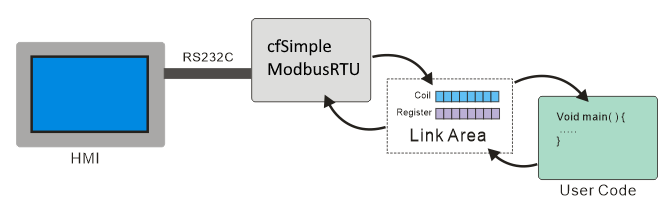
Therefore, users do not need to worry about MODBUS communication and only need to read or write to the buffer. The buffer is eventually connected to the widgets (screen components with built-in communication functions: buttons, lamps, etc.) on the ComfileHMI screen, and through this, you can check whether the operation is being executed and the status.
Create Comfile Studio project
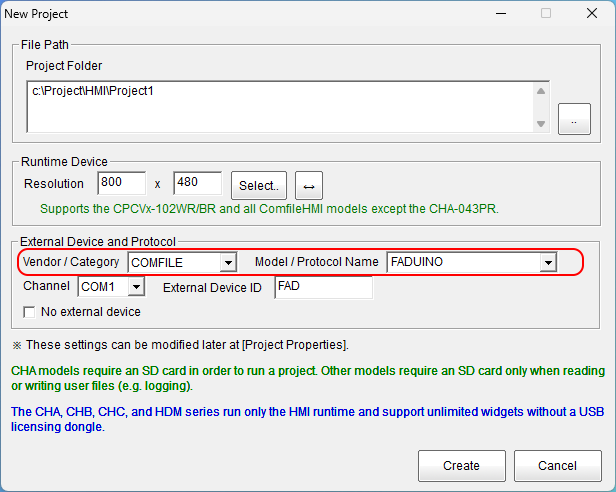
When creating a project in Comfile Studio (ComfileHMI drawing software), select the options below.
Example of use

Frequently asked questions and answers
- Q: Can't I use 3 channels on the CPU as a MODBUS SERVER at the same time?
- A: Only one can be used.
- Q: Can I use a other brand HMI?
- A: It is impossible. Modular FADUINO supports only ComfileHMI.
- Q: Communication connection with ComfileHMI is lost in certain operations. Why?
- A: When writing code, interrupts should not be disabled in user code.
- Q: What is baud rate?
- A: It is fixed at 57600 and cannot be changed by the user.