Table of Contents
Managed Code base Libaray
To make it easier for users to use, we have created a single library of what has been explained so far.
Download “cfManagedBase” file, unzip it, and place it under the Arduio/Libaries folder.
- user_setup() function: Here, the user enters everything needed for initialization.
- loop() function: This is the basic loop function provided in Arduino. You can write code the user main program here.
- logic_proc() function: Here we enter logic processing for digital inputs and outputs, which will be executed every 20 mS.
#include "cfManagedBase.h"

void user_setup()
{

}

void loop()
{

}

void logic_proc()
{

}
Port Addressing
This is when the existing input/output buffer array is used. The frequent use of square brackets makes it somewhat inconvenient to write.
Y[0] = X[0]; // Main Logic Program
I have already included the definition statement in a more convenient form inside the library. You can express the above source as follows.
Y00 = X00; // Main Logic Program
It must be written in 3 characters, all capital letters.
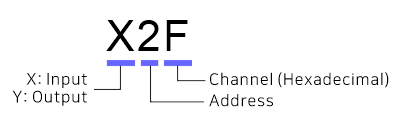
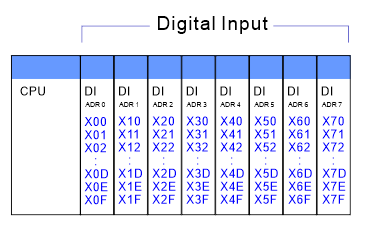
This is the addressing reference table when all input/output modules are installed.
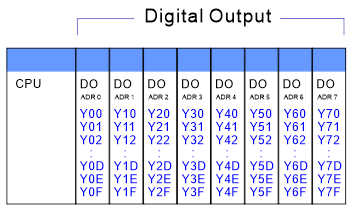
Of course, you can also use existing arrays.
  for (i=0; i<16; i++) {
    Y[i] = 0;
    } // clear Y00~Y15
You can give any name you want, in fact I recommend this.
#define MainMotor Y[0]

MainMotor = 1; // Main motor turn on
Notification
Please use this source at your own risk. If this source is applied to an actual project, we are not responsible for any errors or accidents. Please use this source only if you agree to this. We are not accepting technical inquiries regarding this source. Please understand this.