Table of Contents
Create a timer
Let's add a timer to the basic program we created earlier. Timers are very often used in automation fields.
On Timer
It is the most basic timer that outputs only when a signal is received for a certain period of time.
We need two timer related arrays:
#define timerMaxLimit 20
uint8_t Tstat[timerMaxLimit];  // Timer status
uint32_t Tvalue[timerMaxLimit];  // Timer Current Value
In this example, we only used a total of 20 timers. You can adjust the number of timers by changing the number 20 above.
- Tstat array: Stores the state of the timer. 1 means On, 0 means Off.
- Tvalue array: An array that stores the increase and decrease values of the timer.
Let's see how OnTimer works.
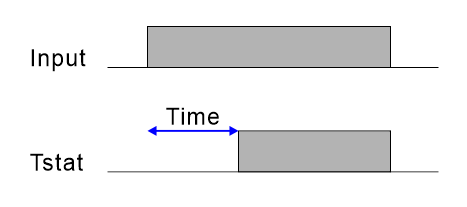
When input comes in, the output (Tstat) turns on only after the specified time has elapsed.
#include "CFMEGA.h"
CFNET cfnet;

uint8_t X[128]; // Input Coil
uint8_t Y[128]; // Output Coil

void distribute_value(uint16_t val, uint8_t where) {
    for (int i = 0; i < 16; i++) {
        X[where++] = val & 0x01;
        val >>= 1;
    }
}

void input_proc() {
    for (int i = 0; i < 8; i++) {
        distribute_value(cfnet.digitalRead(i), i * 16);
    }
}

uint16_t collect_value(uint8_t where) {
    uint16_t tempV = 0;
    for (int i = 0; i < 16; i++) {
        tempV |= Y[where++] << i;
    }
    return tempV;
}

void output_proc() {
    for (int i = 0; i < 8; i++) {
        cfnet.digitalWrite(i, collect_value(i * 16));
    }
}

ISR(TIMER5_OVF_vect)
{
  TCNT5 = 198; // for 20mS

  sei(); //  Start Gloval Interrupt

  timertn_proc();
  input_proc();
  logic_proc();
  output_proc();
  tick_flag = 0;
}

// Timer

uint16_t system_timer=0, tick_flag=0;
#define timerMaxLimit 20
uint8_t Tstat[timerMaxLimit];  // Timer status
uint32_t Tvalue[timerMaxLimit];  // Timer Current Value

void timertn_proc() {
  system_timer++;
  if (system_timer == 5) {
    tick_flag = 1; // Turn On every 100mS
    system_timer=0;
  }
}

void onTimer(uint8_t inputValue, uint8_t timerIndex, uint16_t timerInitValue)
{
  if (tick_flag) {
    if (inputValue) {
      if (Tvalue[timerIndex] < timerInitValue) {
        Tvalue[timerIndex]++;
        if (Tvalue[timerIndex] == timerInitValue) {
          Tstat[timerIndex] = 1;
        }
      }
    } else {
      Tvalue[timerIndex] = 0;
      Tstat[timerIndex] = 0;
    }
  }
}

//
// User Source
//


void setup() {
  TCCR5B = 5; // Clock source from system clock/1024
  TIMSK5 |= 1;	//TOV interrupt set.
  sei(); // Start Gloval Interrupt

  // Clear Timer array
  for (int _i=0; _i < timerMaxLimit; _i++) {
    Tstat[_i] = 0;
    Tvalue[_i] = 0;
  }

}

void loop() {


}

// Run every 20mS

void logic_proc()
{
  Y[0] = X[0];  // Main Logic Program
  onTimer(X[0],0,8); // 800mS On Timer
  Y[1] = Tstat[0];  // Watch Tvalue
}
If you look at the logic_proc at the bottom of this source, you can see the part where onTimer is used.
Let me explain how to use each onTimer parameter.
  onTimer(Input source, Timer number, Timer value);

  onTimer(X[0],0,8); // 800mS On Timer
- Input source : Here we used the X[0] input.
- Timer number : Here, timer 0 was used.
- Timer value : Here, 8 means 800mS. This timer is in 0.1 second increments.
Therefore, when the above source is executed, when X[0] is input, timer 0 is output 0.8 seconds later. You can see the results in Y[1].
If you are a beginner, you will often use the delay() statement in your source code. However, experts never use the delay() statement. This is because during delay(), the MCU is in a standby state where it does nothing. In the meantime, incoming sensor input is also ignored. Naturally, the machine will not be able to operate normally.
However, maintaining the output state for a certain period of time is very frequently required. In that case, each output state must be given a unique timer. The only solution to this is the timer source described here.
Notification
Please use this source at your own risk. If this source is applied to an actual project, we are not responsible for any errors or accidents. Please use this source only if you agree to this. Please just use it as a reference. We are not accepting technical inquiries regarding this source. Please understand this.