
Table of Contents
MOACON CPU Module
The CPU module features the following:
- 32-bit ARM Processor (ARM CORTEX)
- Clock Speed: 72MHz
- Program Memory: 512KB Flash Memory
- Data Memory: 64KB SRAM
- Non-volatile Memory: 32KB F-RAM
- Built-in Real-Time Clock and Battery
- Built-in RS-232 Port
- LCD and 7-Segment Control Port
- 24V Power Input (Built -in Power Regulator)
The MOACON CPU module (DP-CPU500) comes with an external power supply (5V 2A Output, 10W power supply). This power supply will power all the modules in the system when connected to the CPU module, so power supplies are not included with any other IO module.
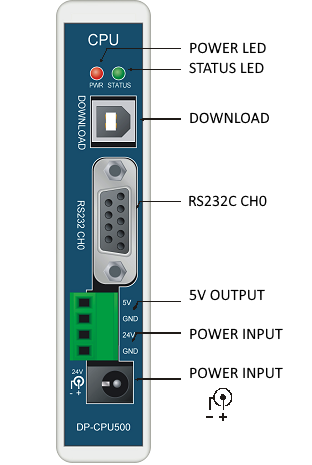
- POWER LED: Lit when power supplied.
- STATUS LED: Set using statusLed command.
- DOWNLOAD: Connect to PC. Use for program downloading and debugging.
- RS232 CH0: Built-in RS-232 Channel 0 for interfacing to RS-232 capable devices.
- 5V OUTPUT: Internally generated 5V output terminal
- POWER INPUT: 24V Power Input. Use either the barrel jack or the header, but not both.
| DP-CPU500 | Specifications |
|---|---|
| Input Voltage | 24VDC |
| Input Voltage Range | 18 – 28VDC |
| Approx. RTC Battery Life | 10 years |
| Operating Temperature | 0 ~ 55 oC |
| Storage Temperature | -20 ~ 70 oC |
Display Devices
The MOACON's CPU module includes two display ports on the side of the module for interfacing to Comfile Technology’s various display devices. One port is for interfacing to Comfile Technology's 7-segment display devices (CSG-4M, CSG-4S) and the other is for interfacing to Comfile Technology's character LCD (CLCD) devices (CLCD420-B, CLSD420-G, CLCD216-G), all of which are available at http://ComfileTech.com.
For the CLCD modules, connect the Moacon's “LCD” port to the LCD module's “CUNET” port.

CLCD and CSG devices interface cable can be up to 3 meters in length. A 1-meter cable is available at http://ComfileTech.com

Use the clcd functions for the CLCD display modules and the csg functions for the CSG modules.
Installing CPU Module
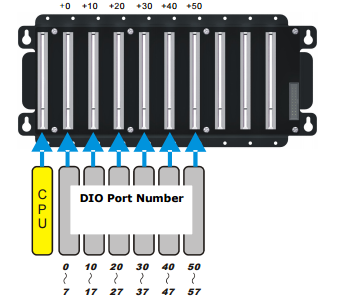
The CPU module must be mounted on the far left of the 10-slot main board in the position labeled “CPU”.
WARNING: Do not plug or unplug modules while the power is on.