
Additional PCB Design Tips
If you are designing a board based on a microcontroller or a CUBLOC module, the following guidelines can help improve reliability and reduce noise-related problems.
Generate the 5V supply on the same board as the MCU.
A common mistake is to generate 5V on one board and then run that 5V through a cable to another board containing the MCU.
Avoid doing this whenever possible.
Long 5V power lines can act like antennas, picking up noise along the way and delivering it directly to the MCU.
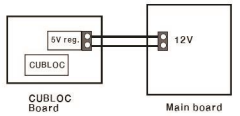
A better approach is to distribute a higher voltage, such as 12V or 24V, and then generate the 5V locally on the board where the MCU is installed.
Use sufficiently thick power wires.
The main power wiring carries all of the system's current, so it should not be undersized.
Using thicker wires helps reduce voltage drop and improves noise immunity. For most control systems, power wiring should be noticeably heavier than signal wiring.
Do not expose MCU pins directly to the outside world.
This is one of the most common design mistakes.
Any signal that leaves the PCB can potentially bring noise, static electricity, or surge energy back into the MCU.
If external connections are required, consider adding protection components such as series resistors, TVS diodes, varistors, or ESD protection devices. In harsher environments, isolation using optocouplers may also be appropriate.
Consider a 4-layer PCB if the budget allows.
A 2-layer PCB can work perfectly well for many applications, but a 4-layer PCB offers some advantages.
By dedicating internal layers to power and ground planes, the board becomes much more resistant to noise and signal integrity problems.
Of course, the tradeoff is cost. A 4-layer PCB is more expensive, but it can save a great deal of troubleshooting time later.