개발PC 환경 설정을 마쳤다면,
Visual Studio를 이용하여 프로그램(App)를 만드는 방법과 CFHEADER library(Nuget Packages) 설치 방법을 설명합니다.
-
-
위 설정을 마쳤다면 아래의 예제 코드로 동작을 확인할 수 있습니다. ( CFHEADER [ADDR. 0] + CFDO-16N [ADDR. 0] )
using ComfileTech.Cfnet.Cfheader;

var cfheader0 = Cfheader.Instances[0];
var digitalOutputModule0 = cfheader0.DigitalOutputModules[0];

cfheader0.Open();

while (true)
{
    // Blink each output in increasing order
    foreach (var channel in digitalOutputModule0.Channels)
    {
        channel.Blink();
    }

    // Blink each output in decreasing order
    foreach (var channel in digitalOutputModule0.Channels.Reverse())
    {
        channel.Blink();
    }
}

static class Extensions
{
    public static void Blink(this DigitalOutputModule.Channel channel)
    {
        // Toggle the channel's state
        channel.Toggle();

        // Delay for 50ms
        Thread.Sleep(50);

        // Toggle the channel's state again
        channel.Toggle();
    }

    public static void Toggle(this DigitalOutputModule.Channel channel)
    {
        // Toggle state
        channel.State = !channel.State;

        // Write the state to the module
        channel.Module.Header.Sync();
    }
}
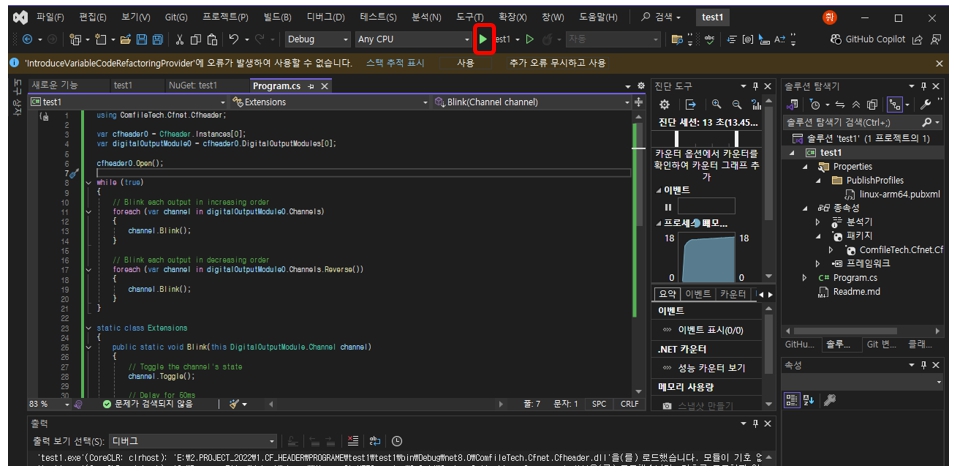
아래 예는 여러 개의 CFHEADER모듈 사용 프로그램입니다. [ CFHEADER[0, 1, 2] x CFDO[0, 0, 0] ]
[소스 보기]
using ComfileTech.Cfnet.Cfheader;

// Get the CFHEADER instances
var cfheader0 = Cfheader.Instances[0];
var cfheader1 = Cfheader.Instances[1];
var cfheader2 = Cfheader.Instances[2];

// Open USB communication for each CFHEADER instance
cfheader0.Open();
cfheader1.Open();
cfheader2.Open();

// Create a thread for each CFHEADER instance
var thread0 = new Thread(() => Demo(cfheader0));
var thread1 = new Thread(() => Demo(cfheader1));
var thread2 = new Thread(() => Demo(cfheader2));

// Start each thread
thread0.Start();
thread1.Start();
thread2.Start();

// Wait for each thread to finish
thread0.Join();
thread1.Join();
thread2.Join();

void Demo(Cfheader cfheader)
{
    // Get the digital output module
    var cfdo_16n0 = cfheader.DigitalOutputModules[0];

    // Initialize all channels to 0
    cfdo_16n0.State = 0x00;

    while (true)
    {
        foreach (var channel in cfdo_16n0.Channels)
        {
            // Toggle the channel on
            channel.State = !channel.State;
            channel.Module.Header.Sync();

            // Delay for 50ms
            Thread.Sleep(50);

            // Toggle the channel off
            channel.State = !channel.State;
            channel.Module.Header.Sync();
        }
    }
}
CFHEADER