
Table of Contents
Set Pad
Set Pad mode, packetSize, bufferSize
| mode | Bit mode (0 to 255) |
| packetSize | Packet size (1 to 255) |
| bufferSize | Receive buffer size (1 to 255) |
The Cubloc has a dedicated port for keypad / touchpad inputs similar to a PC’s keyboard or mouse port. This port can be used with the Set Pad command to create interrupts when input is received on a keypad, touchpad, etc.,. This port is as an SPI slave.
To use pad communication, you must use a Set Pad command at the beginning of your program. Pad communication uses 4 wires. SCK is used as the clock signal, SS as the slave select, MOSI as the master out/slave in, and MISO as master in/slave out.
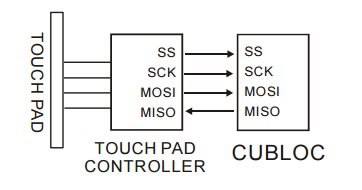
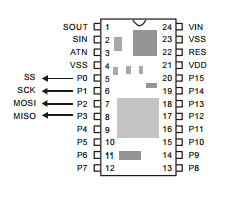
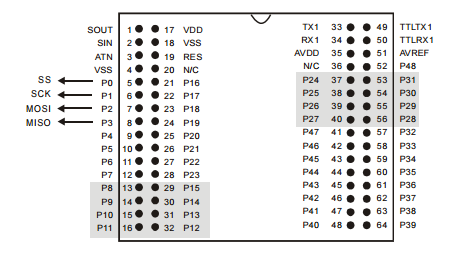
I/O ports P0 through P3 can be used for pad communication.
packetSize
The packetSize parameter sets the packet size needed to cause an interrupt.
For example, the Cutouch panel requires 4 bytes to be received before an
interrupt is generated.
bufferSize
The bufferSize parameter is the total size of the receive buffer. The buffer
size must be at least 1 more than the packet size. A larger buffer will
essentially give you more time to process the interrupt service routine. The
buffer size is usually set to 5 or 10 times the packet size.
Mode
The mode parameter will set the receiving mode of the received data.
Please refer to the following table:
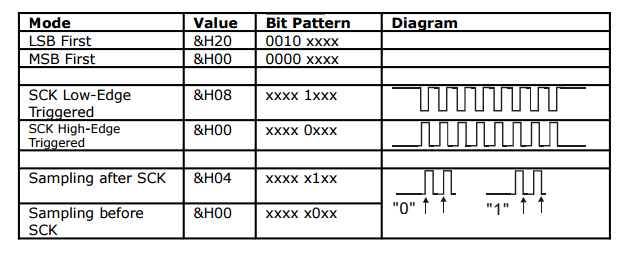
The receiving modes can be combined. For example, for MSB first, High-Edge Triggered SCK, and sampling after SCK:
0x00 + 0x00 + 0x04 = 0x04
Here are some common examples:
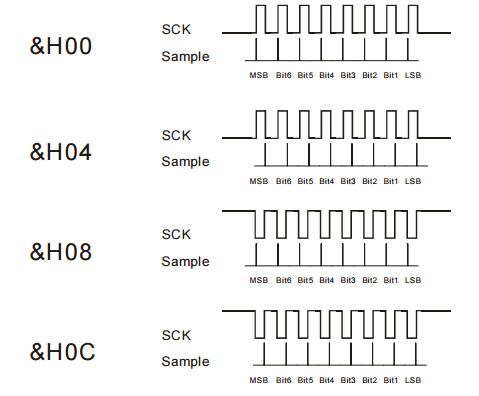
For pad communications, you can use Comfile’s keypads and touch screens.
The Set Pad command will automatically set the I/O mode of ports P0 through P3; the user doesn’t have to set them.