
Table of Contents
Running the Sample Project
After installing jControls CF35, a sample project can be found in the installation directory (e.g. “C:\Program Files (x86)\ComfileTools\jControls CF35 v1.1.0”)
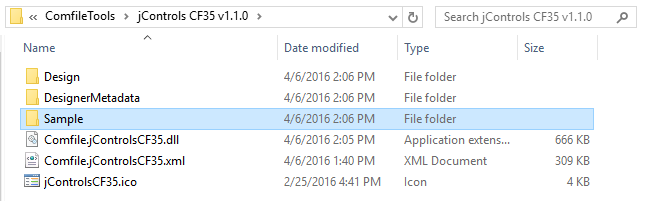
Copy to a New Location
In modern Windows operating systems, users typically do not have write access to the Program Files folder, so instead of running it directly from the installation folder, copy it to a another folder where the currently logged in user has write access (e.g. the user's desktop).
Open the Solution in Visual Studio
From its new location, open the Sample\Sample.sln solution file in Visual Studio.

Deploy and Execute
Press F5 to deploy and execute the project. Be sure to select the appropriate device.

Runtime Video
<html><center> <iframe width=“560” height=“315” src=“https://www.youtube.com/embed/Q8NA9bbfDjI” frameborder=“0” allowfullscreen></iframe></center> </html>