
This is an old revision of the document!
CF-SHIELD
이 모듈은 Arduino Ethernet Shield 2 보드를 장작하여
ETHERNET 통신을 구현할 수 있도록 한 베이스 모듈입니다. CFMEGA2 CPU 모듈과 연결하여 사용되며, 이더넷 기반의 통신 기능을 가능하게 합니다.
- CFMEGA2 모듈 왼쪽에 연결하여 사용합니다.
- 정품의 Arduino Ethernet Shield 2 (W5500기반)보드를 사용해야 합니다. 구매는 이곳에서
- Arduino에서 제공하는 Ethernet 라이브러리를 사용해야 합니다.
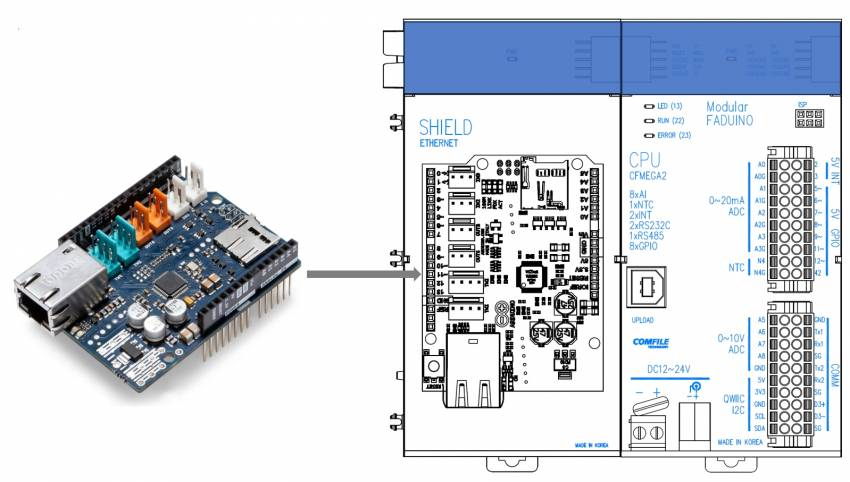
Arduino Ethernet Shield 2 보드는 저희 컴파일 테크놀로지에서 판매하고 있지 않습니다. 네어버 검색을 통해 다양한 구매처로부터 구매가 가능합니다. 또한 Arduino Ethernet Shield 2 보드는 저희 회사에서 기술지원하지 않습니다. 구매하신 곳에서 기술지원을 받으시기 바랍니다.
각 부의 설명
이 제품은 CFMEGA2 로 부터 Arduino Ethernet Shield 2 보드 연결에 필요한 신호선 (4, 10, SPI, 전원선등)만 가져온 것입니다. 따라서 다른 GPIO핀들은 메인 CPU모듈과 연결되어 있지 않습니다.

예제 프로그램
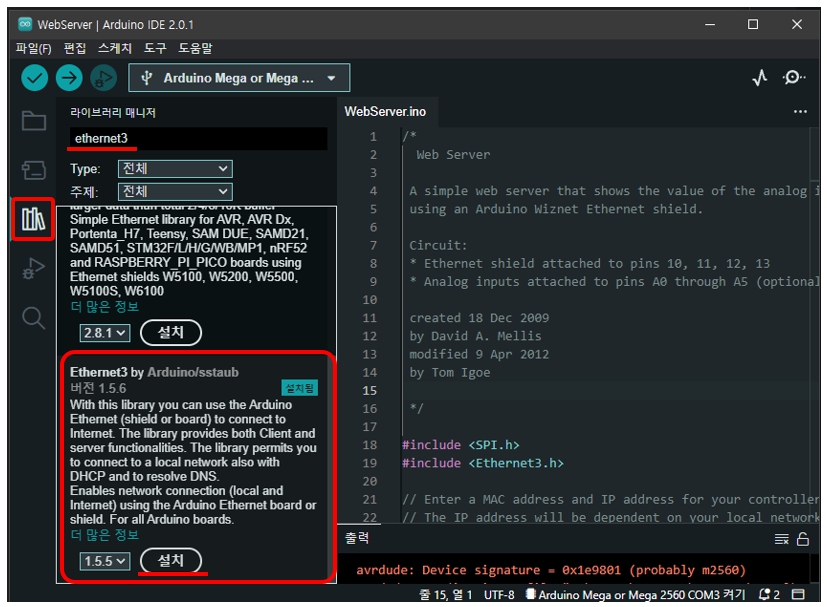
- 라이브러리 등록 : 라이브러리 매니저 » “ethernet3”검색 » Ethernet3 설지
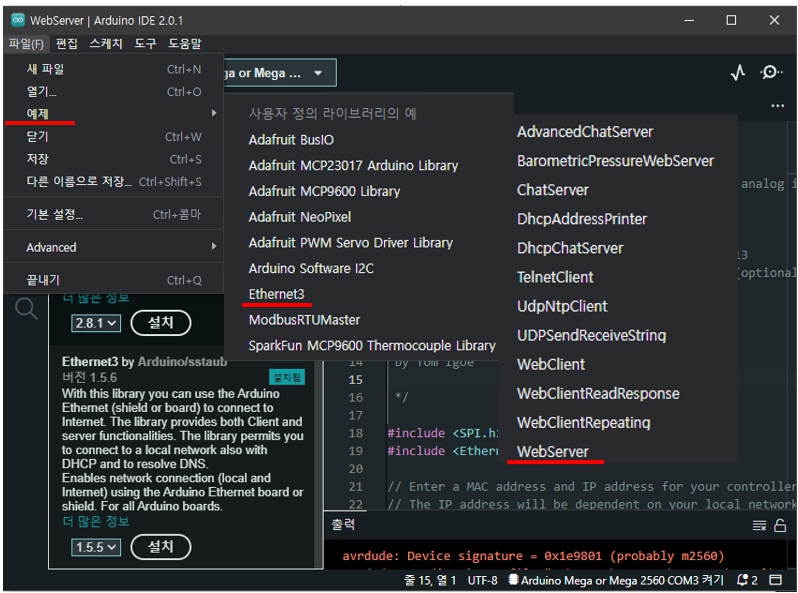
- Webserver 예제 프로그램 : 파일 » 예제 »Ethernet3 » Webserver
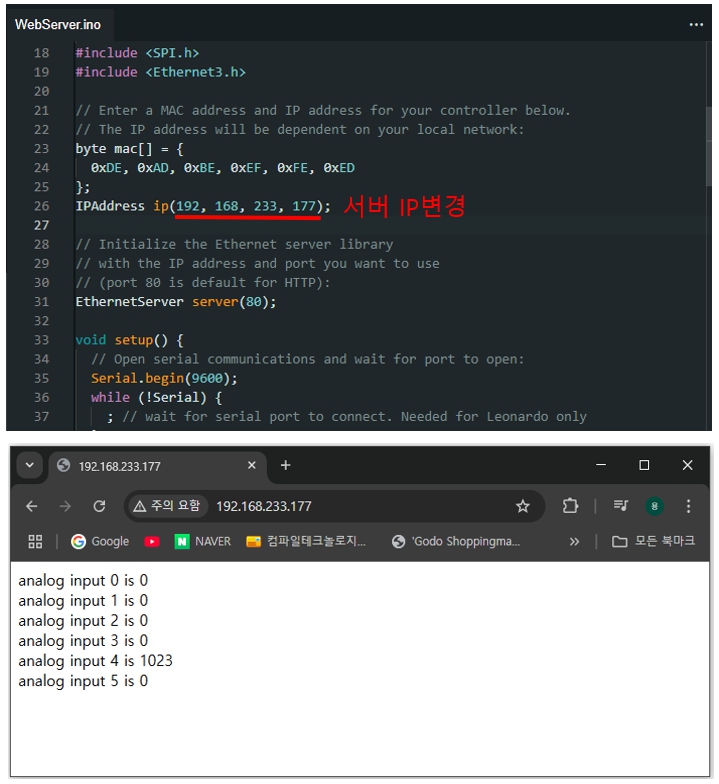
- SDCARD Webserver 예제 프로그램
웹서핑을 통해 찾은 사용예입니다. 이 소스에 대한 기술지원은 제공할 수 없는 점 양해바랍니다.
#include <SPI.h>
#include <Ethernet3.h>
#include <SD.h>

// MAC address from Ethernet shield sticker under board
byte mac[] = { 0xDE, 0xAD, 0xBE, 0xEF, 0xFE, 0xED };
IPAddress ip(192, 168, 233, 177); // IP address, may need to change depending on network
EthernetServer server(80);  // create a server at port 80

File webFile;

void setup()
{
    Ethernet.begin(mac, ip);  // initialize Ethernet device
    server.begin();           // start to listen for clients
    Serial.begin(9600);       // for debugging

    // initialize SD card
    Serial.println("Initializing SD card...");
    if (!SD.begin(4)) {
        Serial.println("ERROR - SD card initialization failed!");
        return;    // init failed
    }
    Serial.println("SUCCESS - SD card initialized.");
    // check for index.htm file
    if (!SD.exists("index.htm")) {
        Serial.println("ERROR - Can't find index.htm file!");
        return;  // can't find index file
    }
    Serial.println("SUCCESS - Found index.htm file.");
}

void loop()
{
    EthernetClient client = server.available();  // try to get client

    if (client) {  // got client?
        boolean currentLineIsBlank = true;
        while (client.connected()) {
            if (client.available()) {   // client data available to read
                char c = client.read(); // read 1 byte (character) from client
                // last line of client request is blank and ends with \n
                // respond to client only after last line received
                if (c == '\n' && currentLineIsBlank) {
                    // send a standard http response header
                    client.println("HTTP/1.1 200 OK");
                    client.println("Content-Type: text/html");
                    client.println("Connection: close");
                    client.println();
                    // send web page
                    webFile = SD.open("index.htm");        // open web page file
                    if (webFile) {
                        while(webFile.available()) {
                            client.write(webFile.read()); // send web page to client
                        }
                        webFile.close();
                    }
                    break;
                }
                // every line of text received from the client ends with \r\n
                if (c == '\n') {
                    // last character on line of received text
                    // starting new line with next character read
                    currentLineIsBlank = true;
                }
                else if (c != '\r') {
                    // a text character was received from client
                    currentLineIsBlank = false;
                }
            } // end if (client.available())
        } // end while (client.connected())
        delay(1);      // give the web browser time to receive the data
        client.stop(); // close the connection
    } // end if (client)
}

기술 지원 정책
고객님께서 개발 중이신 소스 코드는 기술 지원 대상에 포함되지 않습니다. 제품이 이상이 있다고 판단되시는 경우, 제품 자체를 저희 회사로 보내주시기 바랍니다. 저희가 만든 소스와 지그로 테스트 한뒤 이상 유무를 판단해서 이상이 발견된 경우 조치해드리고 있습니다.