
This is an old revision of the document!
Table of Contents
~~META: title = ComfilePi - Industrial Raspberry Pi Panel PC ~~
metatag-description=(The ComfilePi is an industrial Raspberry Pi touchscreen panel PC from COMFILE Technology.) metatag-keywords=(ComfilePi, Raspberry Pi, Industrial Panel PC, Touchscreen)
ComfilePi
The ComfilePi is an industrial touchscreen panel PC built around the Raspberry Pi Compute Module.
What is the Raspberry Pi?
The Raspberry Pi is a revolutionary, compact single board computer (SBC) made in the United Kingdom by Raspberry Pi, Ltd. It typically runs the Linux operating system.
In addition to the credit-card-sized Raspberry Pi SBCs, Raspberry Pi also produces the Raspberry Pi Compute Modules for industrial solutions. The ComfilePi panel PCs utilize the Raspberry Pi Compute Module.
What is the ComfilePi?
The ComfilePi is an industrial panel PC built around the Raspberry Pi Compute Modules, and augmented with additional hardware and features for industrial automation solutions (e.g. touch screen, real-time clock, RS-485, etc.).
- The CPi-C models are built around the Raspberry Pi Compute Module 4. View the Raspberry Pi Compute Module 4 Datasheet
- The CPi-S models are built around the Raspberry Pi Compute Module 4S. View the Raspberry Pi Compute Module 4S Datasheet
Most ComfilePi panel PCs are UL Listed.
ComfilePi Features
Operating System
Each ComfilePi panel PC will come with a slightly modified Raspberry Pi OS Linux distribution installed to the device's SD card or eMMC storage. You can always re-image your SD card or eMMC by downloading our Raspberry Pi OS image and following the instructions there.
The Raspberry Pi OS as downloaded from Raspberry Pi, or other operating systems may work, or may partially work, but we only provide support for the operating systems that we provide. If you run into any problems, please be sure you are using our latest operating system image.
IO Board Accessories
| CP-IO22 | CP-IO22 PNP | CP-IO19R | CP-IO22-A4-2 | CP-IO13-4C | |
|---|---|---|---|---|---|
| Digital Inputs | 11 @ 12~24VDC (Bipolar) | 11 @ 12~24VDC (Bipolar) | 11 @ 12~24VDC (Bipolar) | 11 @ 12~24VDC (Bipolar) | 7 @ 12~24VDC (Bipolar) |
| Digital Outputs | 11 @ 30VDC Max (NPN) | 11 @ 30VDC Max (PNP) | 8 Relays | 11 @ 30VDC Max (NPN) | 7 @ 30VDC Max (NPN) |
| Serial Ports | 2x RS-232C | ||||
| Analog Inputs | 4 @ -5 ~ +5VDC | ||||
| Analog Outputs | 2 @ 0~5VDC | ||||
| More Information | Details | Details | Details | Details | Details |
| Supports | CPi-S Series | CPi-C Series | |||
| Buy | Coming Soon | Buy | Buy | Buy | |
IO Features
GPIO Header
The 5V pins can supply a maximum current of 1A. The 3.3V pins can supply a maximum current of 700mA. If both 5V and 3.3V rail pins are used simultaneously, their total power should be kept below 5 watts.
The panel PC's RTC is connected to I2C1, so those pins assigned to I2C1 should not be reconfigured.
CPi-S
The GPIO ports of the CPi-S series have the same layout as the original Raspberry Pi, but there are some differences. Some ports (RS232, 485) are already connected elsewhere and are not available on the GPIO ports. There is an internal buffer chip for ESD protection.
 See pp.5 of the Compute Module 4S datasheet for more information.
CPi-C
The CPi-C series panel PCs have a 26-pin header socket on the rear panel with the following pinout.
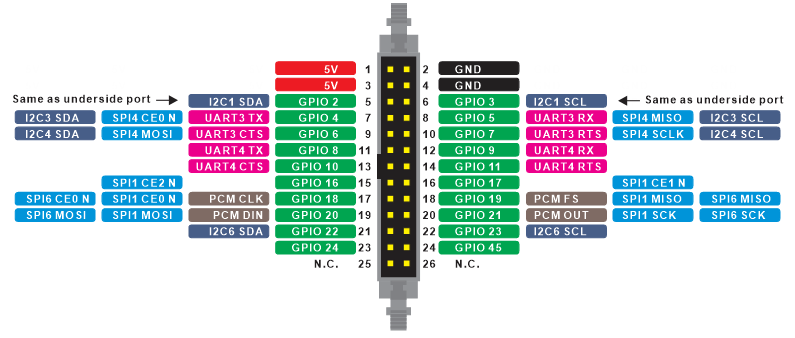 See pp.8 of the Compute Module 4 datasheet for more information.
The GPIO pins are not exposed through a level shifter like the CPi-C and CPi-S panel PCs, so, with the exception of GPIO45, the internal pull-up/-down resistors can be utilized. GPIO45 has an internal 1.8kohm pullup resistor to 3.3V because it is initially used for I2C (See Table 6 of the Compute Module 4 datasheet).
Underside IO Ports
The underside of the ComfilePi exposes 12~24VDC power input, 1 RS-232 serial port, 1 RS-485 serial port, 3 USB 2.0 ports, an I2C port, 5V power output, and an RJ45 Ethernet port.
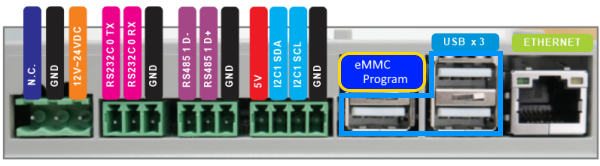
Please note that the I2C pins (SDA and SCL) are 3.3V; the 5V pin is supplied to ensure users have enough voltage and current to power their external devices and does not imply a 5V I2C port.
The ComfilePi has a USB device port dedicated to programming the Compute Module's eMMC.
Side Panel IO Ports
The right panel of the ComfilePi exposes a MicroSD card slot and a stereo audio output jack.

For models with an eMMC, the MicroSD card slot is not electrically connected, so it cannot be used.
Developing Software for the ComfilePi
The ComfilePi, like most Linux computers, can be programmed in just about any programming language. The following guides illustrate just a few of the possibilities.
- .NET (C# & VB.Net) - Develop and debug applications for the ComfilePi using C#, VB.Net, .NET 8, and Mono.
- C/C++ - Develop and debug applications for the ComfilePi using C and C++, including GUI applications using frameworks such as Qt, and GTK+.
- Java - Develop and debug applications for the ComfilePi using Java and JavaFX.
- NODE-RED - A flow-based, low-code development tool for visual programming developed originally by IBM for wiring together hardware devices, APIs and online services as part of the Internet of Things.
- CodeSys - An integrated development environment for programming controller applications according to the international industrial standard IEC 61131-3.
Touchscreen
- Calibrating the Touch Screen - Explains how to calibrate the ComfilePi's touch screen.
- Rotating the Screen - Change the screen orientation by 90, 180, or 270 degrees.
- Hiding the Mouse Cursor - Explains how to hide the mouse cursor in X Windows.
- Disabling the Touch Screen - Explains how to disable the touch screen in case the ComfilePi is being used for touchless applications like digital signage.
- Controlling the LCD Backlight - The LCD Backlight can be controlled via one of the ComfilePi's GPIO pins.
- Configure X11 Touchscreen Gestures - Configure X Windows so a long-touch, touch-and-hold, will simulate a right-click and a touch-and-drag will scroll.
Realtime
- Installing a real-time kernel - Explains how to install a real-time kernel to a ComfilePi panel PC using the Bookworm OS or later.
- Improving Real-Time Performance - Explains how to improve the real-time performance of the ComfilePi
Panel Mounting
Miscellaneous
- Migrating an Existing Solution from the CPi-A/B to the CPi-C/S - Recommendations for migrating an existing solution from the CPi-A/B Compute Module 3 panel PCs to the CPi-C/S Compute Module 4 panel PCs.
- Serial Port - About the ComfilePi's Serial Port
- Read-only File System with Overlay - Boot the ComfilePi with a read-only mounted file system. All file system modifications are written to RAM and discarded between boots.
- Configure a Program to Auto-Start - Most embedded applications do not run in a desktop environment. This procedure will describe how to configure the ComfilePi to boot to a console instead of a desktop environment, and auto-start a program as a service.
- Controlling the Electro-magnetic Buzzer - The ComfilePi has a built-in electro-magnetic buzzer. By default, it beeps when touched. This feature can be disabled and/or the electro-magnetic buzzer can be used for other purposes.
- 1-wire Communication - Troubleshooting issues with 1-Wire communication
- Enable the Internal Watchdog Timer - Enable the internal watchdog timer to reboot the ComfilePi in case the system stops responding.
- Set Date and Time - Set the date and time of the RTC.
- Ensuring Reliable RS-485 communication - Some recommendations to follow to ensure reliable RS-485 communication on the CPi-A, CPi-B, and CPi-S panel PCs.
- Choosing a USB WiFi Dongle - Some recommendations for choosing a USB WiFi dongle.
- Optimizing to Reduce RAM and Storage Utilization - Some recommendations for reducing RAM and disk space consumption.
<html>
<!-- Need to wait for insiders preview to be released
* [[Access the SD Card's OS Partition on Windows]] - How to access the SD card's ext2 Linux partition on Windows -->
</html>
This Product Requires Linux and Raspberry Pi Experience
If you are new to Linux and the Raspberry Pi, try purchasing and using an ordinary Raspberry Pi first. This product is for those who already have experience with Linux and the Raspberry Pi.
We receive many questions about basic usage of Linux and the Raspberry Pi. There are too many of such questions for our company to respond to, and it is puts strain on our limited resources. Please understand.
Raspberry Pi is a trademark of the Raspberry Pi Foundation