
skip to content
User Tools
Site Tools
Search
Tools
Show pagesource
Old revisions
Backlinks
Fold/unfold all
Recent Changes
Media Manager
Sitemap
Log In
>
한국어
You are here:
index
»
comfilehmi
»
external_connections
Sidebar
go Home
go ComfileHMI Home
Comfile Studio
Comfile Studio Download and Release History
Comfile Studio Installation
Comfile Studio Main Window Overview
Creating a New Project
Modifying a Project's Properties
Installing Windows Mobile Device Center
Deploying a Project
Deploying a Project for Mass production
Project Simulation
Screens
Adding a New Screen and Customizing its Properties
Adding Shapes and Widgets to a Screen
Arranging Widgets on the Screen
Common Features
Device Addressing
Internal Variables, Internal Memory, and Expressions
Fonts (Multilingual Text)
String Variable Control
Widgets
Control Button
Common Widget Properties
Lamp Effect
Screen Transition Button
Multi-action Button
Actions
Numeric Input
Lamp
Toggle Switch
Number
Text
Time
Text Builder
Numeric Keypad
Alphanumeric Keypad
Progress Bar
Slider
Log Viewer
Alram History Viewer
Knob
Trend Graph
Shapes and Graphics
Lines, Rectangles, and Ellipses
Using Rectangles as Background Decorations
Grid
Title Bar
Image
Dynamic Image
Field Resources
Text Resources
Color Resources
Image Resources
Address Resources
Events and Actions
Global Events
Screen Events
Actions
Action Groups
Remote Control
Supervisory Remote Control
Remote Scripting
Web API
Web File Manager
Other Features
System Functions
comfilehmi:external_connections:index
Table of Contents
External Connections
Water Resistant Front Panel Model
Open-frame Model
USB Cable
External Connections
Water Resistant Front Panel Model
USB Host : Supports external keyboard.
Ethernet: Currently not supported. Ethernet functionality is planned for the future.
USB Device (Download Port) : For uploading Comfile HMI Editor projects to the device.
microSD Card :
CHA Series : The microSD card can be used to store HMI project data (e.g. fonts, images, etc…) or for logging and data collection.
CHC Series : is not needed to run a project, but is needed for logging data
RTC battery : RTC batter compartment. Lifetime approximately 8 years.
Open-frame Model
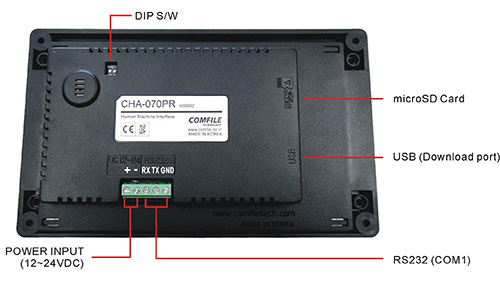
Dip switch for factory reset. For normal operation, set to 1-ON, 2-ON.
USB Cable
A mini-B 5-pin USB cable is required.
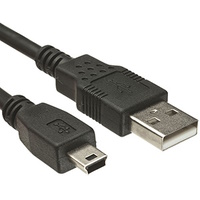
USB cables are typically not included with each purchase. Please purchase separately.
Back to ComfileHMI
comfilehmi/external_connections/index.txt
· Last modified:
2026/02/20 15:37
by
127.0.0.1
Page Tools
Show pagesource
Old revisions
Backlinks
Fold/unfold all
Back to top